Product Overview
A 15 W RGB laser for shows that run outdoors. It puts a full-colour beam in the air from a single projector — one position, one cable run, one fixture to focus — which is what a wide site actually needs.
It is the professional laser light show projector that rental houses and tour producers take when a site has no roof: plazas, waterfronts, theme park sets and festival fields where an indoor fixture would be pushed past what it was built for.
On site it hangs from a truss or sits on a tower behind the audience line, aimed out across the crowd. On large productions it is one cue inside a bigger show file; on smaller ones it is the whole show.
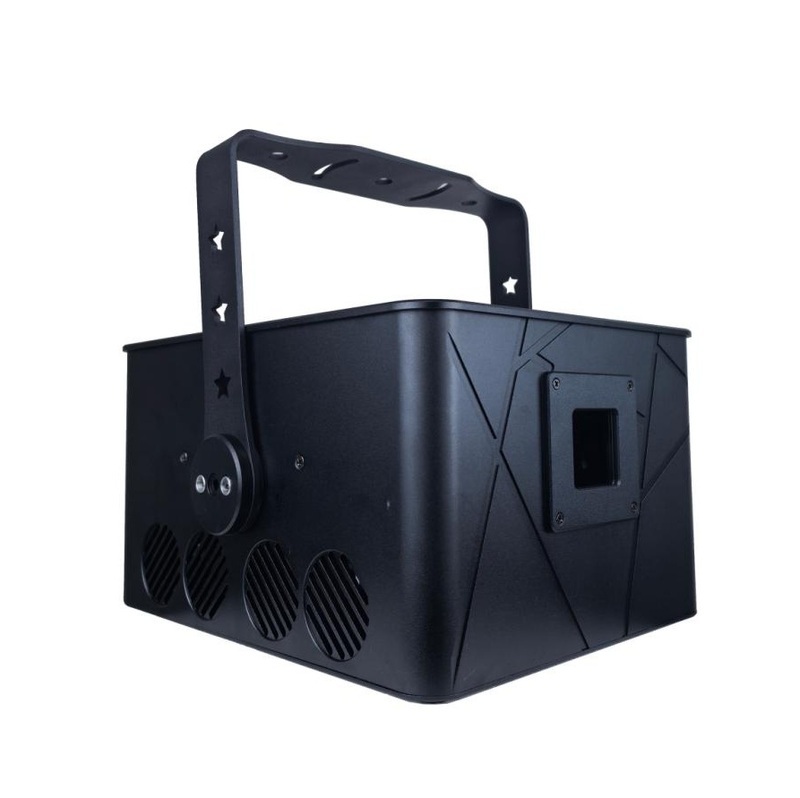
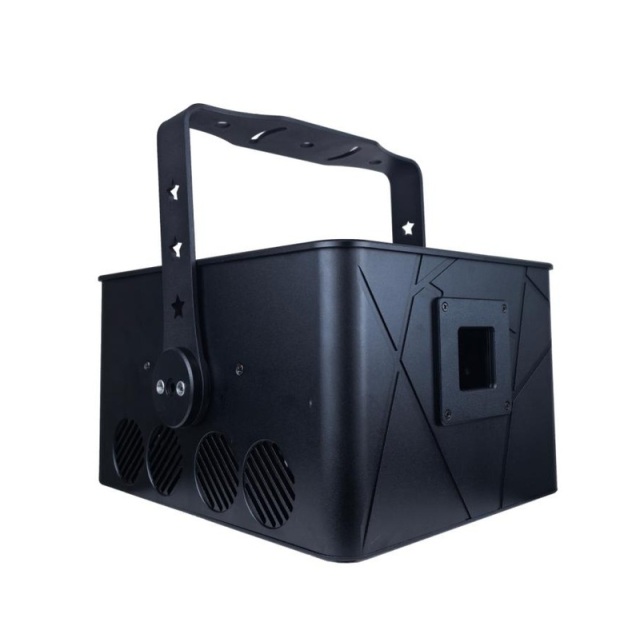
The body is a matte black metal box with a vented side panel and a folding bracket that doubles as a carry handle — the detail that makes one-person rigging realistic on a temporary site.
What it is not: a facade wash. This is beam and graphics work, aerial beams and patterns and text drawn over a site after dark. As an outdoor laser light manufacturer we keep the menu and the channel logic consistent across the laser line, so a crew that knows one unit already knows the next.
Colour & Beam Performance
- Colour mixed at the source.
- Red, green and blue are combined inside the housing before the beam leaves the aperture, so graphics stay clean at the edges and there are no separate red, green and blue heads to align on a truss.
- A blue-weighted split.
- Blue is the largest of the three blocks and green sits just under it, which holds whites neutral and gives cyans and violets real depth without red pushing them pink.
- Fast scanning keeps line work solid.
- The scanning head draws quickly enough that circles, logos and text read as continuous lines rather than dotted ones, so you can fill the frame instead of shrinking a graphic to hide the gaps.
- A wide scan angle from one position.
- A broad scan covers a large slice of a site from a single mounting point, and on a plaza or a waterfront that usually takes a professional laser light show projector and a cable run out of the plan.
- An effect library you can run cold.
- Beams, tunnels, waves and patterns are already in the menu, so an animation laser light program can go up on the first night without a programmer in the building.
- Fades that don't step. Analog modulation lets the console dim and cross-fade smoothly, which shows most on slow numbers and on graphics fading in behind a vocal.
- Output that carries across a lit skyline.
- Total output is enough to keep beams readable against city glow and over a large outdoor site, which is the difference between this and lighter outdoor laser light show equipment.
Control & Programming
- Decide the control route first.
- A professional laser light show projector can be driven from a console over DMX, from ILDA software on a laptop, or left to run stand-alone, and the choice usually follows who is operating on the night.
- Patch it at 14 or 19 channels.
- Both modes sit on the fixture, so pick whichever your existing laser stage lighting show file already uses and avoid rebuilding cue lists on site.
- Set the start address and check the run mode in the menu — master/slave if one unit is going to drive the others on the rig.
- Load the material: a built-in effect from the library, a page of ILDA frames, or a mix of both across the show.
- An animation laser light program can be loaded through ILDA and then triggered cue by cue from the console.
- Record the cues against the music or the show call, then save and back the file up before the first night — the backup is the step most crews skip.
- Set a fallback.
- Sound-active and automatic modes keep something moving on site if the console or the data line drops mid-show, which is what makes a dj laser light show survive an unattended desk.
Applications
Outdoor cultural tours and night tourism are the natural home for this unit: waterfronts, scenic valleys, landmark plazas and heritage sites that run a show every night of the season. Beams go out across a lake or up a hillside, and the projector becomes a fixed part of the site rather than a touring item. That is the setting where outdoor laser light show equipment earns its keep — the site is dark, the audience is far back, and the beams have to carry.
On concert and stadium work the professional laser light show projector sits on the rig beside the rest of the laser stage lighting, adding aerial beam looks between songs and wide fan effects from a single position at the back of the field.
For a dj laser light show — clubs, event nights, discos and after-parties — the built-in library and sound mode mean the set runs without anyone programming, and the same unit still gives a designer something to build on when there is an operator on the desk.
Theme parks, festivals and city anniversary events use it in master/slave groups, with one unit driving a line of projectors so the whole site runs the same effect at the same moment rather than four shows in four corners.
Rental fleets get the most from it as a single model covering both the outdoor tour calendar and the event work in between. As an outdoor laser light supplier we see fleets standardise on one or two laser models for exactly this reason: fewer firmware versions, fewer spare parts, and a crew that already knows the menu.
Specifications
| Model | LTLS-15O |
|---|
| Total laser power | 15 W — 4 W red at 638 nm, 5 W green at 520 nm, 6 W blue at 445 nm |
| Modulation | TTL/analog |
| Scanner | 30 kpps galvanometer |
| Scan angle | Up to 60° |
| Built-in effects | More than 200 |
| Control | DMX 14/19 channel, ILDA software, sound control, automatic operation, master/slave |
| Voltage | 100-250 V |
| Rated power | 200 W |
| Working temperature | -10 °C to 45 °C |
| Ingress protection | IP65 |
| Dimensions | 31.5 × 24.5 × 18.5 cm |
| Weight | 11 kg |
Rigging, Power & Setup
- Survey the beam path before anything goes up: mark the audience line, check sightlines from the far end of the site, and confirm that no rigging, cable or roof structure crosses where the beams will travel.
- Mount it.
- Clamp through the folding bracket on a truss, or fix through the bracket on a tower or wall, keeping the vented panel clear of anything that would block airflow.
- Tell us what you are hanging it from — as an outdoor laser light manufacturer we would rather confirm the clamp before the units ship than after they land on site.
- Check the power run.
- Scanners misbehave and output sags on a soft supply, so give the projector a circuit with headroom and keep it off the same leg as heavy dimmer or motor loads.
- Keep data and mains apart where you can.
- Long DMX or ILDA runs laid parallel to power cable are where most flicker and dropouts begin, and the fix on site is always slower than the fix at the planning stage.
- Protect the connections.
- The housing is sealed, but the point where cable enters it is not: dress connectors so water runs off them, tape or boot them, and keep the aperture clear of standing water.
- Most outdoor laser light show equipment that fails on site fails here, not at the optics.
- Test at low output before doors, then aim against the night sky rather than a nearby wall.
- A beam that looks aligned on a wall will read differently once it is out over an open site.
- Plan for the season, not the night.
- Check the bracket and mounting hardware between runs, clean the aperture and the vents, and log anything that changes so the next site inherits a known-good unit.
Documentation & Downloads
| Specification sheet | Optical, electrical and physical data for the unit, in one document |
| User manual | Menu structure, control modes and the start-up procedure |
| DMX channel chart | Channel-by-channel function list for both the 14-channel and the 19-channel mode |
| Photometric and beam data | Reference material for design, previsualisation and site planning |
| Rigging and wiring guide | Mounting points, hoisting notes and the connector layout |
| Compliance documents | Test reports and certificates for your market, issued on request with the order |
| Revision notes | The current document revision, so a printed channel sheet never goes out of date on site |
Ordering & Delivery
- Quantity and configuration.
- Tell your sales contact how many units the job needs and how they should be split across sites.
- As an RGB laser light manufacturer we quote the quantity you are actually buying rather than a single list figure.
- Lead time.
- Production and shipping schedules are confirmed when the order is placed — each unit is prepared against the order, so ask for the current lead time against your first show date instead of assuming a stock position.
- Payment and trade terms.
- Currency, payment method and Incoterms are agreed on the order confirmation.
- Raise them early if the order has to clear a project milestone or a letter of credit.
- Warranty and claims.
- Warranty period and scope, and the route for a quality claim, are confirmed with the order.
- Ask your sales contact for the current policy in writing so it is on file before the units ship.
- Packing. Each unit ships in an export carton measuring 44 × 36 × 26 cm. If the projectors are going on tour, ask about flight-case packing and a spare-parts kit at the same time.
- Power configuration.
- Confirm the plug and connector type for your market — the unit covers 100-250 V, but the plug on the end of the cable has to match the supply it is going into.
- Spares.
- Ask which spare parts are worth holding for your show calendar.
- As an outdoor laser light supplier we would rather you had a module on the shelf than a dark night on the calendar.
Technical Support & Model Matching
More than 30 engineers with an average of 15+ years in professional lighting stand behind every order — the same people who answer your technical questions. Tell us your venue, rigging height, throw distance and existing control setup; we help match models, check protocol and channel fit, and build a package that works as one system. If a fixture misbehaves on site, we work through the fault with you and sort out spares. Installation and commissioning guidance come with the order. Founded in 2016, exporting since 2022, LITEVISION serves buyers in more than 80 countries from offices in the USA, Taiwan, Mexico and China.
FAQ
How does this compare with the 10 W indoor laser in the range?
Same menu logic, different job. The 10 W indoor model is the one for clubs, studios and any rig that lives under a roof. This one carries a sealed housing, a faster scanning head and more total output for open sites. We build both as an RGB laser light manufacturer, so a crew that knows one already knows the other's channel layout and menu.
Will it draw graphics and animation, or only beams?
Both. The scanner draws vector graphics, so text, logos and outlines come out as lines rather than dots, and an animation laser light sequence loaded through ILDA plays frame by frame alongside the built-in effects.
Can the projector stay outdoors between show nights?
The housing is sealed, and the unit is built to run in ambient temperatures from -10 °C to 45 °C. An outdoor laser light supplier should tell you plainly what that does not cover: keep the aperture dry, dress the connectors so water runs off them, and check the mounting hardware between runs. Leaving it up all season is normal; leaving it in standing water is not.
Will it patch into the console and show file I already run?
Yes. It takes DMX-512 on 14 or 19 channels, so it drops into the laser stage lighting you already control. Both channel modes are on the fixture, so pick the one your file uses and the cue stack stays intact. If the show is built in ILDA software instead, that route is there too.
Can it run a show with no operator?
On a dj laser light show or in a venue without a desk, sound-active and automatic modes keep the effects moving, and master/slave lets one unit drive the rest of the rig. The built-in library is what makes that practical — there is a show in the menu before anyone programs a cue.
What happens if a laser block or the scanner needs attention?
The laser modules are rated for more than 10,000 hours, so a block that fades is a slow problem rather than a sudden one. When something does go wrong, send a short video of the symptom and we will work through the diagnosis with you and confirm which part is involved. As an outdoor laser light manufacturer we would rather ship the right part than have a whole projector travel back.