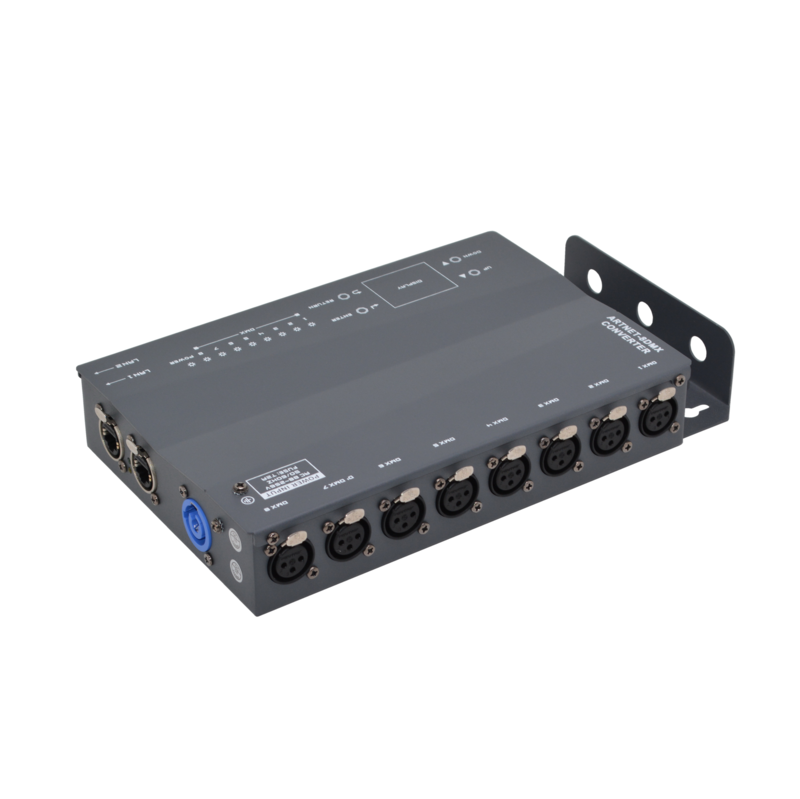
Product Overview
An ArtNet node for the truss, not the control room. The unit takes the ArtNet universes coming out of a console or media server and turns them into physical DMX lines where the fixtures actually hang. A single Ethernet feed comes in, the front panel handles setup, and every output leg starts from the same chassis. It is the shortest path between a network-based desk and DMX cable.
Small enough to live in the case. Nothing about the housing is rack-bound: it travels in a rack drawer or a cable trunk and drops into any dmx lighting system without rebuilding the flight case or the control position. Settings are made on the unit itself, so a spare can be configured on site by the same technician who is patching the rig.
Your programming stays where it is. The node does not change how a show is built. Your dmx lighting controller keeps running cues, the media server keeps playing back, and the unit simply hands the same data to the DMX legs at the stage end of the room.
Where it is used. Rental houses put one in each stage rack, theatres wire it once beside the dimmer racks, and studios keep one behind the lighting positions. In each case it becomes part of the permanent dmx lighting control system and is left alone once the patch is written down.
What it is not. This is not a dmx controller and it stores no cues — it distributes an existing ArtNet stream across isolated DMX ports. If your rig is one desk feeding two short DMX runs, a plain splitter does the same job and you do not need a network node.
Star Distribution, Isolation & Connectors
Star wiring instead of one long chain. Each output feeds a single leg of the rig, so a damaged cable or a knocked connector takes out one group of fixtures rather than everything downstream. That matters most where a dmx controller for moving heads sits at front of house and the fixtures hang two flights up.
Isolation on every port. All inputs and outputs are electrically isolated from one another, a full 100% between any pair. Ground potential differences between the stage and the control position stop at the port, and a fault on one leg cannot travel back into the node or out through the other legs.
Neutrik 3-pin XLR. The DMX ports use Neutrik 3-pin XLR sockets — the connector every rental house already stocks and every cable trunk already carries. No adapter tails, no swapping connector standards at the last minute.
Growing a rig later. Spare ports are the cheapest capacity you can add, and when a dmx lighting system outgrows one chassis, a second unit chains onto the network instead of forcing a full re-cable of the stage.
Status you can read from the floor. Each input and output carries its own LED indicator, so a technician can see which legs are live before walking a dmx lighting control run to find the dead one.
Specifications
| DMX ports | 8, each configurable as input or output |
| DMX connector | Neutrik 3-pin XLR |
| Port isolation | 100% electrical isolation between all inputs and outputs |
| Front panel | TFT display for parameters |
| Power inlet | PowerCON |
| Input voltage | AC 88-256 V, 50/60 Hz |
| Dimensions | 270 x 160 x 45 mm |
| Net weight | 1.25 kg |
| Mounting | Multiple installation methods |
| ArtNet universes per unit | 8 DMX channels per unit |
| 4,096 Universes with linked units | Up to 32,768 Channels with linked units |
| Up to 16,777,216 Supported protocols | ArtNet, DMX512, RDM DMX ports |
| 8 x Neutrik 3-pin XLR, each one configurable as an input or an output Port isolation | 100% electrical isolation between all inputs and outputs Network connection |
| Ethernet, high-speed switch engine with no linking delay Front panel display | TFT screen showing parameters Port status |
| LED indicator on every input and output Power input | AC 88–256 V, 50/60 Hz Power connector |
| PowerCON Dimensions | 270 x 160 x 45 mm Net weight |
| 1.25 kg | |
Applications
- Touring and rental racks: one node per stage rack covers the whole moving-head truss, so the dmx controller for moving heads at front of house no longer needs a long DMX run down the room.
- Theatres, schools and halls: mounted once beside the dimmer racks, it becomes the fixed dmx lighting control system for stage, cyclorama and front light, with spare legs left patched for later additions.
- TV studios and broadcast floors: dimmer racks, LED panels and practicals each get their own legs, which keeps a fault on one circuit away from the rest of the studio.
- Clubs and live venues: a single node replaces a pile of small splitters behind the bar, and the dmx led controller for the LED bars no longer has to share a leg with the moving heads.
- Corporate events and one-off shows: it travels in a case, runs from the venue supply and is configured on site in minutes, so a hired rig behaves like a permanent installation.
- System upgrades: where an older dmx 512 controller has reached the limit of its DMX outputs, the node adds network distribution without replacing the desk.
- Split control positions: front of house, stage and a delay position can each take their own DMX legs from one stream rather than daisy-chaining a dmx lighting system across the room.
Installation & Wiring
- Mount the unit where the display can be read — a rack shelf, the lid of a work case, or a dmx lighting control position at the side of stage, in a covered spot rather than out in the open.
- Run Ethernet from the dmx controller or the network switch to the unit.
- Once the node is on the network, the long haul across the room is data cable rather than DMX.
- Set each port to input or output on the front panel, following the port map you wrote for the show.
- Patch DMX from each output to the first device on that leg, whether that is a dimmer rack, a dmx led controller for the LED bars or the first moving head.
- Keep the DMX side short.
- From here the only DMX cable in the room is the leg from the node to the first fixture; everything back to the dmx 512 controller travels as Ethernet.
- Watch the port LEDs as you patch.
- A dark port at this stage is a cable or address problem you can fix on the ground instead of in the air.
- Label both ends of every cable and write the port map on the case lid, so the next technician can rebuild the dmx lighting control system without guessing.
Ordering & Delivery
- Quantity and configuration: tell us how many units you need and what each rack has to do.
- Minimum order quantity, volume pricing and the production schedule are confirmed with your sales contact for your order.
- Lead time: production and delivery dates are set per order and depend on quantity and configuration, so confirm them before you fix a show date.
- Payment and trade terms: payment method, currency and delivery terms are agreed on the order confirmation.
- Warranty and after-sales: ask for the current warranty period and what it covers, together with the procedure for a unit that arrives faulty.
- Returns and quality claims: report any problem with condition or function to your sales contact with photos and a description of the fault, and the resolution route is confirmed case by case.
- Packing and shipping: units ship in export packing.
- If the node will travel inside a rack or a work case, say so when ordering so the packing matches the way it will be moved.
- Compliance documents: tell us the market you sell into and ask which documents can be provided for it.
- Buying direct: your quote and shipping schedule come from the team that builds the node, so as a dmx lighting controller manufacturer we answer the technical questions and handle the order on the same desk.
- Specification sheet — dimensions, weight, input voltage and supported protocols in one page, ready to send to a venue, a consultant or a freight forwarder.
- User manual — front-panel setup, port direction and the display menu, kept with the rack for whoever is on the show.
- Port and universe reference — how the eight ports map to ArtNet universes, so the patch in the desk matches the physical outputs.
- Dimensional drawing — ask for it before cutting case foam or planning rack space around the unit.
- Version check — confirm which manual and port reference match the unit you received, and keep that set with the case.
- Finding the files — the Download section lists the current documents, and as a dmx lighting controller supplier and manufacturer we can send the whole set with a quote for your fleet.
Technical Support & Model Matching
More than 30 engineers with an average of 15+ years in professional lighting stand behind every order — the same people who answer your technical questions. Tell us your venue, rigging height, throw distance and existing control setup; we help match models, check protocol and channel fit, and build a package that works as one system. If a fixture misbehaves on site, we work through the fault with you and sort out spares. Installation and commissioning guidance come with the order. Founded in 2016, exporting since 2022, LITEVISION serves buyers in more than 80 countries from offices in the USA, Taiwan, Mexico and China.
FAQ
Can some of the DMX ports be inputs while others are outputs?
Yes. All eight ports are configured independently, so a rack can take two incoming DMX lines at one position and send six legs out to the rig, or run every port as an output when the desk is the only source. Direction is changed on the front panel, and the port LEDs follow the setting.
Which consoles and software can feed this unit?
It is compatible with ArtNet, DMX512 and RDM, and is used to extend the DMX output of Tiger Touch, MA consoles and MADRIX software. If you are unsure how your desk publishes ArtNet, send us the model and we will tell you which settings to check on the dmx 512 controller before the first show.
Should the node sit at front of house or at the stage?
Normally at the stage end, close to the first fixtures, because that keeps the DMX runs short and puts the distance on the network cable. A second unit is useful at the dmx lighting control position when the operator also needs local DMX outlets, and the dmx controller itself never has to leave the desk.
Will it drive LED fixtures as well as moving heads?
Any DMX512 fixture can hang on the outputs: moving heads, dimmer racks, LED battens running from a dmx led controller, hazers, practicals. On a typical rig the legs are split by fixture type, so the moving-head groups sit on their own outputs and the LED package on others, while everything still answers to the same dmx lighting controller you already program on. That split is also what makes a dmx controller for moving heads workable on a large rig, because the moving-head legs are separated from the rest.
Does it need a laptop or software running to work?
No. Port direction and parameters are set on the front panel with the display, so the unit runs from power and network alone. The console or media server supplies the ArtNet stream, and the node needs no computer of its own once it is configured.
How does it mount in a rack or at a control position?
The chassis carries mounting ears and supports several installation methods, so it can sit on a rack shelf, be fixed to a tray inside a work case, or be mounted at the side of stage where the DMX legs begin. It is compact enough that it does not need a flight case of its own.