Signal Distribution
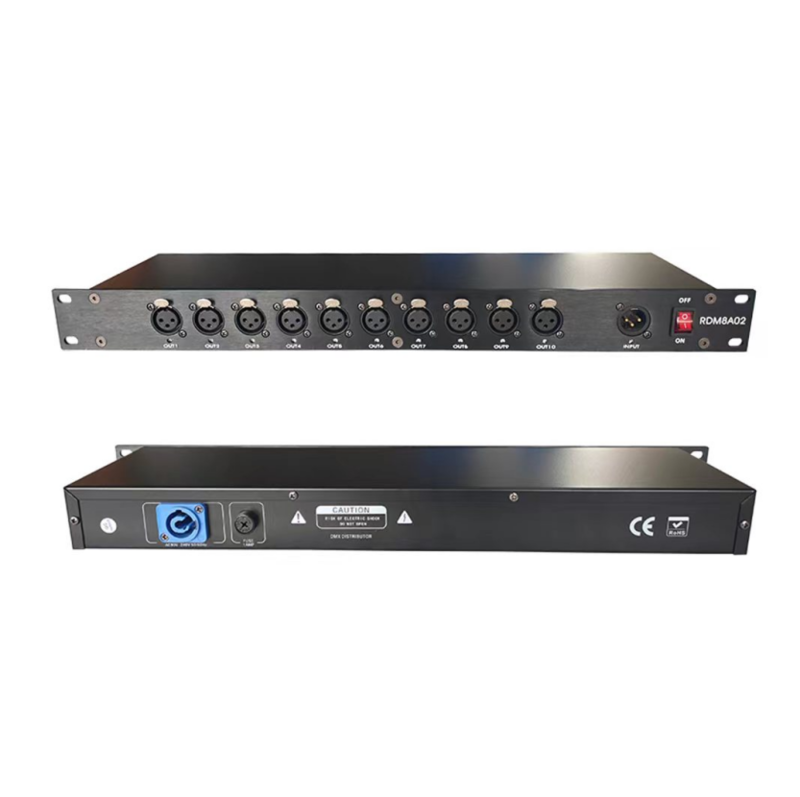
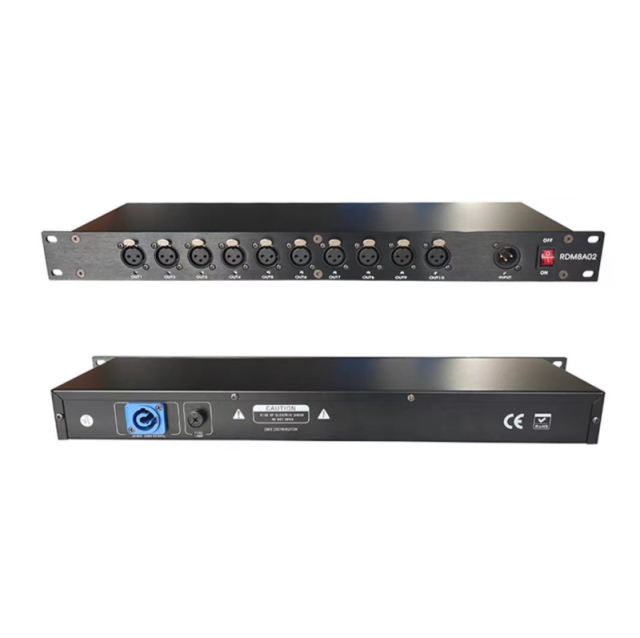
- One input feeds ten outputs, giving your dmx lighting system separate cable routes from a central distributor. Each connection carries DMX/RDM data to its assigned fixture branch.
- A signal indicator at every output gives technicians a visible check during dmx lighting control setup. Use the indicators to see activity at the distributor before tracing cables and devices farther along a branch.
- Signal shaping and amplification rebuild the outgoing data waveform and support extended transmission runs. For concert stage lighting, establish the permitted cable distance for the actual cable, connected equipment and installation conditions rather than assuming a fixed reach.
- Separate branches support a larger connected installation than a single data-bus chain. Keep each branch within the permitted loading of the connected devices; a numerical fixture limit is not specified for this unit.
- As your stage lighting equipment supplier, we supply this model with controller-output protection intended to support safer, more stable distribution. Confirm the protection circuit and ratings for your installation; do not assume galvanic or optical isolation.
Specifications
| Property | Value |
|---|
| Supply voltage | AC 90–240 V |
| Supply frequency | 50/60 Hz |
| Net weight | 1.74 kg |
| Unit dimensions | 48.4 × 4.5 × 14 cm |
| Rack format | 19-inch, 1U |
| Gross weight | 2 kg |
| Packed dimensions | 53.5 × 18.5 × 10 cm |
RDM Fixture Communication
RDM adds a return path to dmx lighting control, allowing supported fixtures to send information back through the distributor. Commands travel toward the fixtures, and their responses return to the connected controller.
Remote addressing lets an operator change a compatible fixture's address from a dmx lighting console rather than working at the fixture's local controls. This is particularly useful when a fixture's display is difficult to reach after installation.
Supported stage lighting fixtures can return device or library-related parameter information. The accessible fields depend on what the fixture exposes and what the controller can read; do not assume that every setting is remotely available.
The fixture-identification function helps an operator locate a selected light in the rig. Its visible response depends on the fixture's own implementation, so check the identification behavior during setup before relying on it during maintenance.
As a professional stage lighting supplier, we recommend verifying the exact MA controller model and software version when using fixture feedback. This unit supports returning fixture data to MA and other RDM-capable controllers, but individual combinations still need to be checked.
Every device between the controller and the fixture must support the required return communication. Include intermediate distributors, adapters and other signal equipment when checking the complete chain, and test the functions you intend to use with the installed firmware.
Rack Installation
- Place the distributor in an accessible rack location within your dmx lighting system. Use the mounting ears and suitable rack hardware, allow room for rear connections and ventilation, and keep cable strain off the sockets. Rack ears alone do not establish approval for suspension or truss mounting.
- Confirm the signal connector pin count, gender and pin assignment with LITEVISION, your professional stage lighting supplier, before preparing cables. The unit has circular signal connections, but their appearance alone does not establish the required wiring or adapter arrangement.
- Connect the controller feed to INPUT and route the outgoing cables to their intended fixture chains. Use DMX data cable, maintain a clear branch-labeling scheme and apply termination according to the connected equipment's instructions; passive Y-cables are not a substitute for active distribution.
- With the power switch off, check the supply against the electrical rating and connect the rear power inlet using the correct mains cable. The illuminated rocker switch provides local power control; keep the switch and power connection accessible after rack assembly.
- For concert stage lighting installations, secure temporary cable runs against pulling, crushing and trip hazards before commissioning. Test ordinary fixture response and then the required return communication before the rig is handed over for operation.
- Keep the unit protected from moisture until its environmental limits are confirmed. Disconnect mains power before attending to the rear fuse holder, use only the specified replacement fuse after its rating is verified, and leave internal servicing to qualified personnel.
Application Layouts
- Theatre and school stages: theatrical stage lighting often spans overhead bars, side positions and floor-mounted equipment. Route cables by physical area so a fixture change at one position does not require threading a new cable through unrelated parts of the stage.
- Rental preparation benches: organize outgoing connections by the truss, stand or stage area that will receive them. A clearly labeled rack and cable loom make the prepared wiring easier for the event crew to reproduce on site.
- Concert stages: concert stage lighting can include front truss, rear truss, side towers and floor packages. Plan routes around the rig's physical structure, keeping access paths and moving scenery clear of data cables.
- Television and production studios: group stage lighting fixtures by grid area or set zone so cable routes remain understandable when sets change. Keep the routing record with the studio's technical notes to help technicians reconnect equipment after a production move.
- Clubs and entertainment venues: a dmx lighting system may serve a dance floor, performance platform and decorative lighting positions. Separate the cable routes by location while keeping the distributor accessible for routine inspection and later alterations.
Ordering & Delivery
- Confirm the exact model marking, connector layout and supplied accessories with LITEVISION as your stage lighting equipment supplier. Agree the required quantity, minimum order quantity, any volume-price tiers and the quotation currency before placing the order.
- Confirm the production period, dispatch date and estimated delivery schedule for your quantity and destination. Distinguish manufacturing time from transport time, and have the agreed dates recorded in the order documents.
- Agree the accepted payment method, payment stages and trade terms. Confirm the named delivery place or port and which party is responsible for freight, insurance, import clearance, duties and taxes.
- Confirm the packing method, carton quantity and transport protection. Gross weight: 2 . KG. Size: 53.5×18.5×10 cm. Verify how these entries apply to the agreed packing configuration before arranging freight.
- Obtain the applicable warranty duration and written coverage, including exclusions, repair arrangements and responsibility for associated transport charges. Ask which maintenance parts can be supplied for the exact model and confirm their terms separately.
- Agree the return, replacement and quality-objection procedure before dispatch. Establish how issues should be documented, the applicable reporting period and whether authorization is needed before a unit is sent back.
- Before final approval, review the quotation and order documents with your professional stage lighting supplier. Make sure the equipment description, quantities, technical requirements and agreed commercial terms match the order you intend to receive.
Downloads & Compliance
Ask us about the model-specific specification sheet and operating manual, including their revision dates. Confirm which files are available for download before completing the technical documentation for your installation.
For theatrical stage lighting projects, request a dimensioned mounting drawing and connection diagram. These should establish mounting-hole positions, connector orientation and the space needed to insert and remove cables once the unit is fitted.
A dmx lighting console needs its own channel-assignment information. Ask whether a splitter-specific channel document applies to this unit, and obtain the controller's output mapping separately rather than treating physical output labels as channel definitions.
Photometric files belong to light-emitting equipment. Obtain those files for the stage lighting fixtures used in your design; this distributor does not produce the light output represented by a photometric file.
Ask LITEVISION, as your stage lighting equipment supplier, to identify the safety and environmental documentation applicable to the exact unit and destination market. Confirm the scope and model identification of any test report or certificate before using it for project approval.
For maintenance records, request any available service instructions covering external inspection and fuse replacement. Keep the document revision with the installed unit's identification so future technicians can distinguish operating instructions from internal repair procedures.
Controller Pairing & Capacity
- Potential companion: Consider the 1024 DMX Controller when selecting control equipment for RDM10. Both models list RDM support, but this does not establish a tested pairing. Confirm the connectors, controller software version and required functions with us before ordering them together.
- Channel capacity: Splitting a feed does not create additional channels or independent universes. All ten branches distribute the incoming control data; they do not multiply the controller's available capacity. Choose your controller capacity separately from the number of cable branches you need.
- Fixture addressing: A separate output branch is not a separate addressing space. Fixtures receiving the same feed must still be addressed and patched according to your intended control groups. Moving a fixture to another branch does not, by itself, make it independently controllable.
- Controller output allocation: The 1024 DMX Controller lists 1024 channels and four physical DMX outputs. Confirm how those channels are assigned to the outputs before planning which feed will enter RDM10; do not assume that four sockets mean four independently addressable universes.
- Console fixture profiles: Reading fixture parameters through RDM does not install a console fixture profile. Obtain a profile matching the exact fixture model, operating mode and channel layout, then complete the console patch separately. Remote parameter access and show programming are different functions.
- Network connections: The companion controller's ArtNet support does not give RDM10 an Ethernet input or protocol-conversion function. Plan a DMX/RDM feed into the splitter. If your system starts with network data, confirm the equipment needed to provide that feed rather than treating RDM10 as an Ethernet-to-DMX node.
Technical Support & Model Matching
LITEVISION brings together more than 30 engineers who have worked in the industry for an average of 15+ years. Share your purchasing requirements and the models you are considering to discuss the available options with our team. We provide product maintenance and technical support, with customer service staff available to answer your questions and help address issues. Whether you are comparing options before ordering or need assistance after purchase, contact us with your technical questions and maintenance concerns.
FAQ
Do the ten branches create ten independent universes?
No. The branches distribute the incoming data; they do not add independent universes or increase the channel capacity available from the controller. dmx lighting control capacity remains determined by the upstream control equipment. Show programming and playback also remain controller functions.
Can I use this splitter with the 1024 DMX Controller?
The 1024 DMX Controller is a potential companion dmx lighting console because it also supports RDM. A tested pairing is not established, so confirm the connection format and operation with the intended software version. The console's ArtNet capability does not make this splitter an Ethernet-to-DMX converter.
Does reading fixture parameters install a fixture profile in my console?
No. Reading information from a fixture through RDM is separate from installing the console profile used to control it. For theatrical stage lighting, the profile must still match the fixture's operating mode and channel layout.