Console Specifications
| Property | Specification |
|---|
| Control standard | DMX512/1990 |
| DMX channel capacity | 1024 channels |
| Physical DMX512 outputs | 4 outputs |
| Patch capacity | 96 moving-head fixtures or 96 dimmers |
| Network lighting protocol | Art-Net supported |
| Remote fixture addressing | RDM protocol supported for remote address adjustment |
| Mobile control | Mobile app and tablet control supported |
| Software updates | Remote software upgrades supported |
| Supply voltage | AC 100–240V |
| Console dimensions | 485 × 400 × 105 mm |
| Console weight | 6.25 kg |
| Standard packing dimensions / weight | 565 × 485 × 210 mm / 10 kg |
| Flight case packing dimensions / weight | 565 × 470 × 230 mm / 16 kg |
Shape & Scene Programming
- Built-in trajectories: As a dmx controller for moving heads, this unit provides 227 built-in shapes, including circle, spiral, rainbow and chase effects. These give programmers ready-made patterns to develop rather than building every movement from individual positions.
- Independent shape adjustment: Tailor stage lighting effects with separate amplitude, speed, interval, wave and direction settings. Adjust the movement to the lighting design instead of treating each built-in pattern as a fixed result.
- Advanced grouping: Organize fixtures into groups for dmx lighting control across different parts of the rig. Group-based programming is useful when a design calls for separate treatment of overhead fixtures, side positions or stage areas.
- Lighting overlap: Build layered looks for theatrical stage lighting using the overlap function. Rehearse combinations with the actual patch so the interaction between programmed elements matches the intended scene.
- Patch and movement adjustments: Address-code rearrangement, vertical/horizontal exchange and channel-output reversal help adapt programming to the rig. These functions are useful when addressing or fixture orientation differs between installations.
- Parameter recording: The dmx 512 controller supports adjustable parameters and program recording, allowing edited settings to become part of a stored program. Review the recorded result with the connected fixtures before using it in a performance.
Playback & Operator Controls
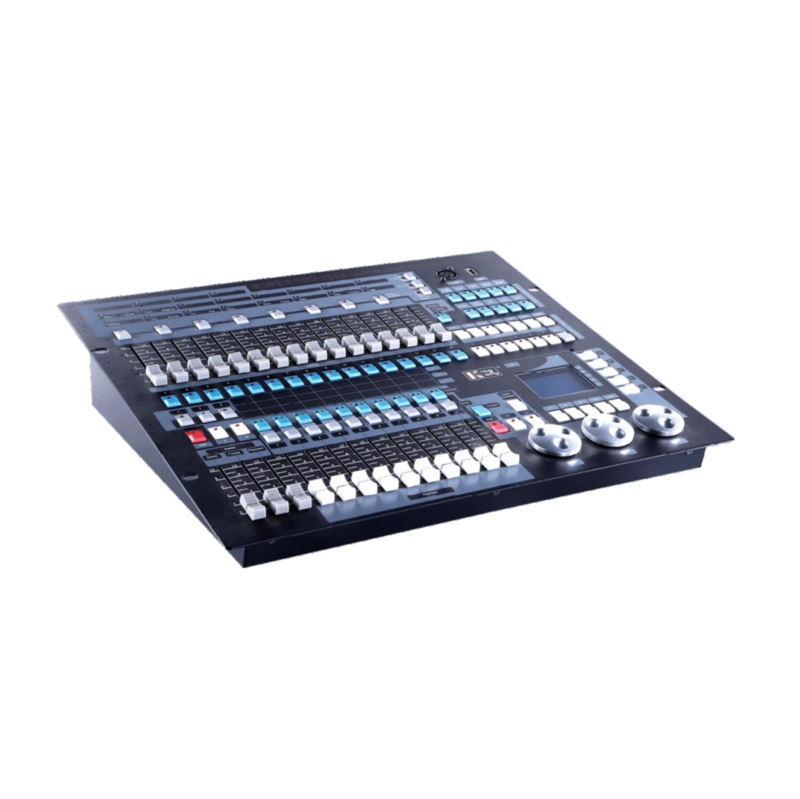
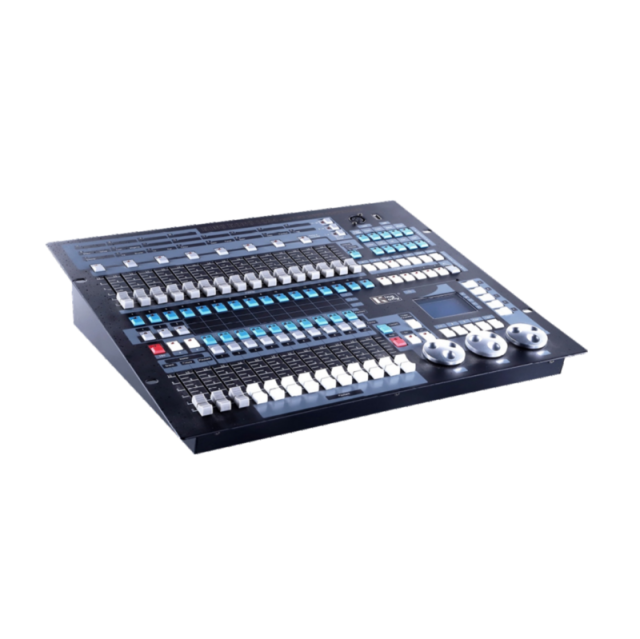
The dmx lighting console brings slider-fader banks, grouped buttons, an integrated display and rotary control wheels together on a sloped operating panel. At least 16 physical faders are provided, with page turning to access further controls without requiring a separate physical fader for every stored assignment.
The dmx 512 controller provides at least 60 playbacks, while each multi-step scene can store up to 600 individual steps. Organize recorded material around the show's running order so operators can reach the required sequence without searching through unrelated programming.
Timecode recording supports recorded-show workflows for dmx lighting control. This is useful when a production needs repeatable timing rather than relying entirely on manual cue changes.
Automatic program startup allows a programmed sequence to begin when the console boots. Check the intended startup program during rehearsal, particularly where the first lighting action must wait for performers, stage clearance or another department.
Programmed data can be retained after normal shutdown or sudden power failure. Data retention is different from uninterrupted operation: a loss of mains power can still stop the live show, so establish a restart procedure for the venue.
A professional gooseneck working lamp helps illuminate the operating area during indoor and outdoor performances. For outdoor events, keep the console in a protected control position; an outdoor-performance application does not establish weather resistance.
Ask us, your dmx lighting controller supplier, about the button assignments and rotary-control functions your operators expect to use. Reviewing the control layout against their normal working habits helps make the handover more practical.
Connections & Commissioning
- Establish the operating position. As your stage lighting equipment supplier, we recommend a stable, supported surface with access to the controls and cable connections. Ask us to confirm any proposed rack installation or suspended mounting arrangement rather than assuming the housing includes approved rigging points.
- Verify mains requirements before connection. Confirm the exact input-frequency rating and 60Hz compatibility against the unit's nameplate, and use the power connection and protective measures specified in the operating instructions.
- Prepare the patch. When connecting a dmx controller for moving heads, match each fixture's selected channel mode to its console profile and address footprint. Physical output sockets do not by themselves establish independently addressable universes; confirm how channels are assigned to the outputs before finalizing the rig.
- Check the wired signal path. Confirm connector types and pin assignments before preparing cables, use DMX-rated data cable, and follow the connected equipment's termination instructions. Keep signal routing distinct from mains distribution, and verify each fixture's response before running the complete program.
- Configure the network connection. ArtNet supports network-based dmx lighting control, but the network addressing, universe settings and output assignments must match the installation. Agree the console and receiving-device configuration before connecting to an existing show network.
- Commission remote addressing. RDM support allows remote fixture-address adjustment when the connected fixtures and intervening signal equipment support the required communication. Check the complete path rather than assuming a fixture will respond simply because its data input accepts DMX.
- Set up mobile operation. App and tablet control are supported; confirm the app name, supported operating systems, software versions and connection method for your device. Test the intended functions from the actual operating area before relying on mobile control during a show.
- Request the current specification sheet for this dmx 512 controller, together with control-panel and connection drawings where available. Check the document revision against the unit being supplied so technicians are working from matching information. For the dmx lighting console operating manual, ask for instructions covering show-file handling, playback-page operation and recovery procedures. The timecode section should identify the supported format, interface and setup method for the intended playback source. Before preparing stage lighting effects offline or in advance of a job, request the available fixture-library files and the procedure for handling an unsupported profile. Obtain the connected fixtures' DMX channel tables as well, so channel names and functions can be checked against their selected modes. Photometric files belong to the connected luminaires, not to a console that generates control data. For theatrical stage lighting calculations, request the relevant fixture photometry separately from the controller documents. Ask for model-specific safety and compliance documents applicable to the destination market. A control-protocol reference is not a substitute for the electrical, safety or environmental documentation required for an installation. Remote software upgrades are supported. Ask us, your dmx lighting controller supplier, for the appropriate firmware version, update method and release information, and confirm which configuration or show data needs to be preserved before an update. Confirm the availability of each requested file rather than assuming every document is included.
Applications & Accessories
- Clubs and entertainment venues: Prepare stage lighting effects around the venue's regular performance areas and music sessions. A clearly documented operating layout helps staff find the right material when different people cover the control position.
- Theatres and school stages: For theatrical stage lighting, organize the show around scene changes, performer entrances and rehearsal notes. Keep the operator's running order alongside the programmed material so technical rehearsals and performances follow the same sequence.
- Television and production studios: A dmx lighting console gives the lighting operator a dedicated workstation for reviewing looks with the production crew. Check the connected fixtures on camera during rehearsals; fixture behaviour and camera results depend on more than the console alone.
- Rental rigs and changing venues: A dmx controller for moving heads can serve rigs that change between jobs. Keep venue-specific patch notes, fixture-mode records and programming notes together so the next technician can understand how the previous setup was arranged.
- Branched lighting installations: Ask us as your stage lighting equipment supplier about a separate RDM10 signal splitter where the rig needs distributed signal branches. Confirm the proposed pairing and wiring before deployment; adding distribution equipment does not increase the console's control capacity.
Ordering & Delivery
- Confirm quantity and pricing. Ask us, your dmx lighting controller supplier, to confirm the minimum order quantity, any quantity-based price breaks and the configuration covered by the quotation.
- Agree the schedule. Confirm availability, any required production cycle, the expected dispatch date and the estimated delivery schedule for the destination. Treat production timing and transport timing as separate parts of the order.
- Set out payment and trade terms. Agree the payment method, currency, applicable trade terms, departure port or collection point, and responsibility for freight, insurance, import duties and taxes in writing.
- Specify the packing arrangement. Packing size/weight:565*485*210 mm/10 kg. Flight case packing size/weight:565*470*230 mm/16 kg. Confirm which arrangement applies, whether a flight case is included in the quotation, and the final transport dimensions and weight for the shipment.
- Confirm after-sales terms. Request the warranty duration and coverage, exclusions, repair procedure, spare-parts arrangements and responsibility for repair transport. Also agree the return or exchange conditions, the procedure and reporting period for quality concerns, and the records needed to assess a claim.
- Finalize the supplied items. For a combined order, ask us as your stage lighting equipment supplier to itemize the console, agreed accessories and any separate distribution equipment so inclusions are clear. Send order enquiries to jason@lite-vision.com or call +86 15999720935.
Technical Support & Model Matching
LITEVISION brings together more than 30 engineers who have worked in the industry for an average of 15+ years. Share your purchasing requirements and the models you are considering to discuss the available options with our team. We provide product maintenance and technical support, with customer service staff available to answer your questions and help address issues. Whether you are comparing options before ordering or need assistance after purchase, contact us with your technical questions and maintenance concerns.