Product Overview
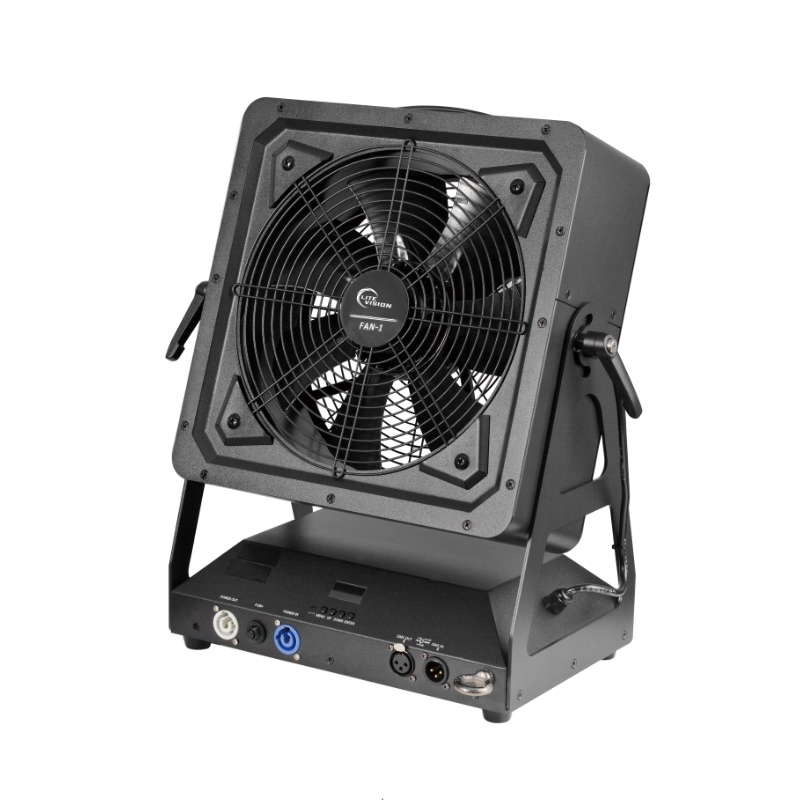
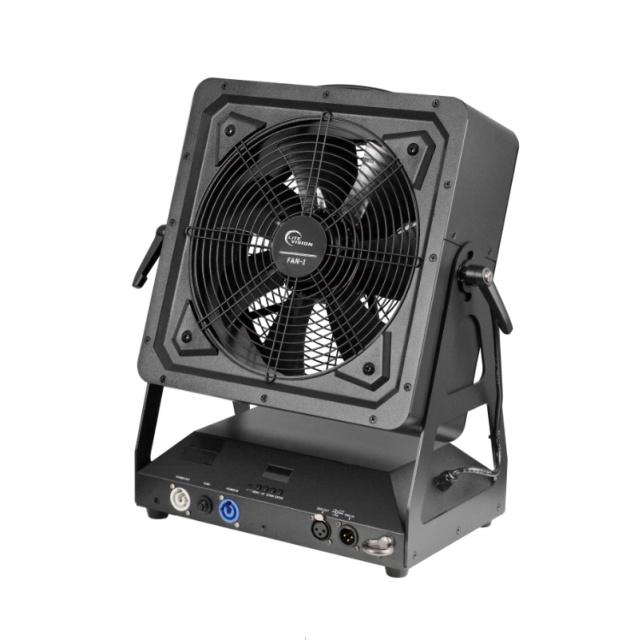
Beams, shafts and low-lying fog only read on camera when the haze sits where the light is. Working alongside the fixtures on the same DMX lighting system, the fan pushes a fogger's output into the beam, drags it off a performer, or holds a floor-level layer steady through a scene instead of letting it creep into the audience. The housing is black with a matte, textured finish. A metal grille protects the blades, two carry handles make load-in easier, and the rear panel holds the fuses, the control section and an OLED display that shows the current setting while you work. It is an accessory, not a luminaire. The fan makes no light and it does not replace a hazer or fogger — the machine makes the smoke, the fan decides direction and speed, and the operator at the DMX controller decides when. That division is what lets one person run haze and beams from a single cue stack. What the fan gives you is control over an effect you already own. Instead of adding more fog to fill a stage, you aim the plume you have, which usually means less fluid, less residue settling on the deck, and a haze layer that stays where the lighting designer put it. LITEVISION is a DMX lighting controller manufacturer and stage equipment supplier based in Guangzhou, and this fan goes out to rental companies, venues and distributors in more than 80 countries. It is built alongside our effects and lighting ranges, so the fans and the machines they work with can be specified together.
DMX Control and Addressing
- Decide what the fan is for before you address it — whether it takes a single cue in a scene or runs a slow follow for a whole number — and give it an address you can remember.
- Pick a free address and set it from the rear panel display, then check it against your patch sheet. Reading the setting off the display as you go is quicker than addressing blind and discovering the mistake at the tech rehearsal.
- Patch the fan into the DMX line with the rest of the rig. It takes standard DMX-512, so it shares a universe with your fixtures and sits inside the same DMX lighting control you are already running.
- Cue it from your DMX 512 controller a beat after the fogger, then stand in the auditorium and watch the airflow rather than the screen — a fan cue that looks tidy in the show file can still push haze into the front three rows.
- Where there is no console — a photo shoot, a corporate day, a rehearsal room — run the fan from the remote control or straight off the rear panel and leave the DMX patch out of it altogether.
- Write the fan into the show file next to the fogger cue, note the address on the patch sheet, and label the cable at load-out. A fan that gets re-patched into a different universe on tour is the usual reason an operator at the DMX light controller reports that it has stopped responding.
Working with Fog and Haze Machines
The fan does not make smoke; it borrows the plume your fogger or hazer is already producing, and its only job in the DMX lighting control system is to move that plume where the shot needs it. That makes placement the first decision — put the fan where the smoke is leaving the nozzle, not at the far end of the stage where it will only stir clear air.
Timing matters as much as position. Cue the fan from the DMX 512 controller a beat after the fog machine rather than with it, so there is already a plume to push, and keep it running a little longer than the fog burst — the smoke keeps travelling after the machine stops.
Thin haze for beams wants gentle, continuous airflow. Heavy fog for a low-lying layer wants a short, stronger push and then stillness, or the layer breaks up before the shot. It is the same fan doing both jobs; only the cue changes.
Watch the room as well as the stage. Air conditioning, propped fire doors and a ceiling fan will move a haze layer further than the fan on the deck can correct, so aim with the draught where you can and expect to reposition once the room is full.
If you are adding a fan to a DMX lighting system that never had one, try it with the fogger you already own before changing anything else. Most of the improvement comes from direction and timing, not from more fluid or a bigger machine.
Mounting and Rigging
- Stand the fan on its yoke on the deck, or clamp the yoke to a bar if it flies. Loose on the floor it will walk with the vibration, so place it where it cannot be knocked and where nobody will trip over the cable.
- Loosen the yoke, tilt the airflow where it needs to go, then tighten it down before the show. Aiming by eye in the middle of a cue is how fans end up blowing haze into the wings.
- Leave clear space in front of and behind the grille. A fan pushed into a corner or hard against a backdrop moves far less air than one with room to draw and discharge.
- Run power and DMX on separate routes where you can. Cable laid along a dimmer feed is behind most of the odd behaviour people blame on a DMX lighting control run, and the fix is usually a re-route rather than a repair.
- If the fan hangs, fit a secondary safety bond through the yoke and use hardware rated for its weight, not a spare hook from the case. For a fixed install, secure the cable and record the address on the patch sheet so the next technician can find the fan inside the DMX lighting control system.
- Two minutes at load-in — fuses seated, cable secure, intake unobstructed — saves a dark cue later in the run.
Stage and Venue Applications
- Theatre and dance — hold a low haze layer at the deck through a scene without letting it creep into the front rows, then lift it on the blackout cue from the DMX 512 controller.
- Live music and clubs — push haze through the beam package for the chorus so the beams read from the back of the room, keep the fan on the same DMX lighting system as the fixtures, and let the layer settle for the quiet number.
- TV studios and broadcast — a light, even haze that makes beam and laser cues read on camera without building a fog bank in front of the lens.
- Corporate launches and reveals — fan and fogger cued together from the same DMX lighting control desk so the smoke rolls out on the beat rather than five seconds after the product appears.
- Rental stock — one more address in the package, carried in the same case as the fogger and patched into whatever DMX light controller the venue happens to supply.
- Photo and video shoots — haze on one side of the frame only, with the fan aimed across the set and cued by hand between frames.
Specifications
| Specification | Value |
|---|
| Power | 200 W |
| Voltage | 220–240 V, 50/60 Hz |
| Input fuse | 3 A |
| Output fuse | 10 A |
| Control | DMX-512 connection to a DMX lighting control system, hand-held remote control, rear OLED display |
| Fan type | Axial, metal front grille |
| Housing | Black matte housing on a tilting yoke bracket |
| Net weight | 8.5 kg |
| Machine size | 405 × 228 × 442 mm |
| Packing size | 450 × 365 × 378 mm |
Documentation and Downloads
| Document | What it covers |
| Specification sheet | Power, voltage, fusing, dimensions and weight on one page, for tender documents and rigging plans |
| User manual | Rear panel layout, addressing, operating modes, cleaning and storage |
| DMX channel table | Channel assignments for each control mode, ready to hand to whoever programs your DMX light controller |
| Compliance and test documents | Reports and certificates held for your market, supplied on request through your sales contact |
| Service reference | Fuse ratings and the parts we can quote separately so rental stock carries its own spares |
| Product photography | Clean shots of the fan for your own sales sheets and dealer listings |
Ordering and Delivery
- Quantity and pricing — tell us how many fans you need and where they are going; the price and any volume break are quoted for that order.
- Lead time — production and shipping slots move with the season, so confirm the date you need the fan on site before you commit to an opening night.
- Payment and trade terms — payment method, currency and Incoterms are agreed with your sales contact for each order; ask for the terms that apply in your market.
- Warranty — warranty length and what it covers are confirmed at the time of order. Keep the invoice and the unit details together in case of a claim.
- Quality claims and returns — if a unit arrives damaged or does not run, report it with photos and the carton condition before putting it into service, and we will take it from there.
- Packing and shipping — each fan travels in its own carton; tell us whether it ships loose, in a flight case or consolidated with a larger lighting order so the packing matches the shipment.
- Spares — if the fan is going on tour, add spare fuses and a second unit to the same order; service parts are easier to plan alongside the fixtures than in a panic mid-tour.
Technical Support & Model Matching
More than 30 engineers with an average of 15+ years in professional lighting stand behind every order — the same people who answer your technical questions. Tell us your venue, rigging height, throw distance and existing control setup; we help match models, check protocol and channel fit, and build a package that works as one system. If a fixture misbehaves on site, we work through the fault with you and sort out spares. Installation and commissioning guidance come with the order. Founded in 2016, exporting since 2022, LITEVISION serves buyers in more than 80 countries from offices in the USA, Taiwan, Mexico and China.
FAQ
Does the fan need a lighting console to run?
No. It can be cued from a DMX controller when it is patched into the show, and it can also be driven from the remote control or straight off the rear panel when there is no console on site — useful for rehearsals, photo shoots and small venues without a programmer. On a normal show night it usually sits on the DMX line next to the fogger so both fire from one cue.
Will it work with my existing fog or haze machine?
Yes. The fan does not connect to the fogger or hazer at all; it moves whatever plume the machine produces, whatever brand it is. Match the two by position and timing: stand the fan where the smoke is already leaving the nozzle, and cue it a beat after the machine rather than with it.
Can I hang it, or does it stand on the floor?
Either. The fan sits on its tilting yoke on the deck and the same yoke lets you aim it upward, or you can hang it from a bar. If it flies, use a secondary safety bond through the yoke and hardware rated for the fan's weight, and confirm your clamp arrangement with us before the rig goes up.
Which voltage does it need?
The fan is rated for 220–240 V, 50/60 Hz. Check the supply at the venue before you connect it, and if your site runs 110–120 V, talk to us before ordering so the supply arrangement is sorted out in advance rather than at load-in.
How do I clean haze residue off the fan?
Isolate the power first, then wipe the grille and the visible blade edges with a soft damp cloth and let everything dry completely before it goes back into service. Haze fluid leaves a thin film that collects dust, so on a touring schedule check it every few shows rather than once a season, and never hose the housing down.
Does the fan make noise?
Yes — it is an axial fan and you will hear it when it runs. In a theatre or a broadcast studio, keep it away from microphone positions and cue it only while the haze needs to travel, instead of leaving it running through quiet scenes.