Product Overview
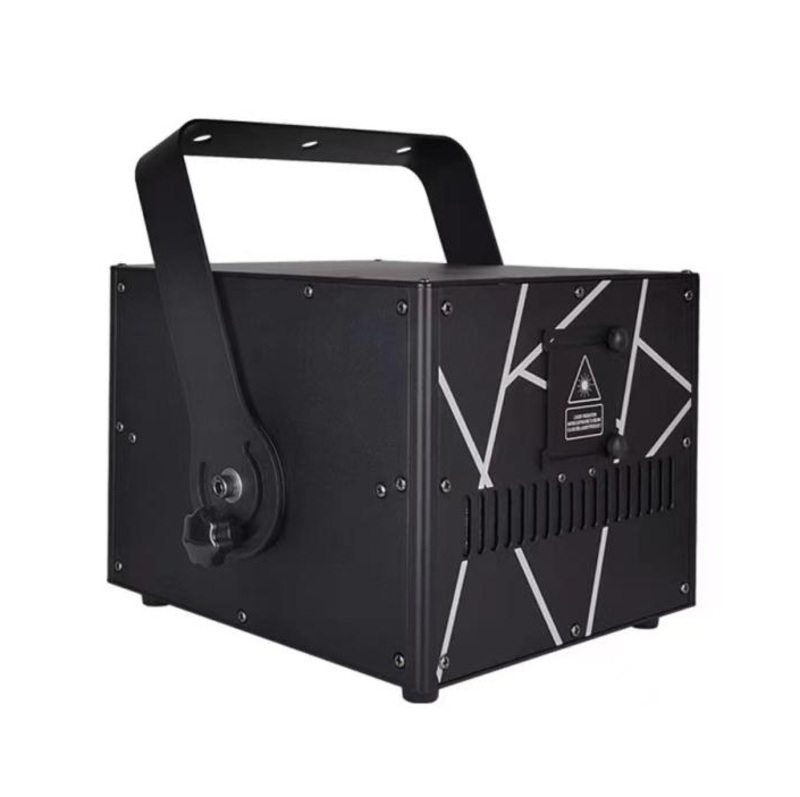
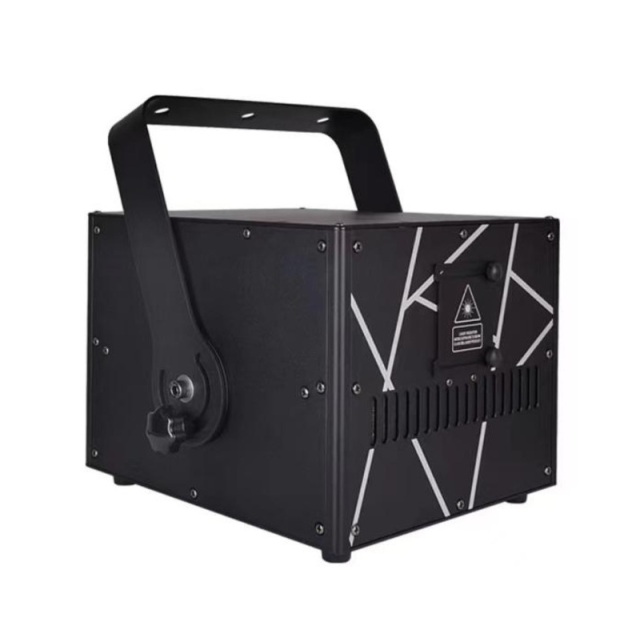
This is an RGB laser light for rooms where the beam has to carry the night rather than sit behind the music. Red, green and blue diode modules are combined into a single beam path, so colour changes happen inside the light itself and every effect arrives in full RGB — deep blue for a drop, warm white for a slow section, saturated magenta for a floor fill. Most of the time it runs on its own. Rental desks can send one model out as a dj laser light on Saturday and as a console-driven fixture on a tour the following week. The body is a compact matte black box with a metal bracket handle for carrying and aiming, a side adjustment knob for setting the angle, and ventilation slots along the housing. That shape suits real venues — it sits on a truss, a shelf or a wall point in a laser stage lighting rig without looking like a temporary install.
Key Features
- Balanced colour mix.
- The three diode modules are matched in output rather than tuned to one show colour, so yellows, cyans and whites hold together the moment a beam sweeps through haze.
- TTL and analog modulation.
- Analog modulation fades each colour module smoothly from full to off, which is what gives soft blends and slow fades instead of stepped colour changes.
- One-person handling.
- Light enough for a single technician to lift into position, aim by the bracket handle and lock the angle before coming back down the ladder.
Control & Programming
Sound-active and automatic. In sound-active mode the fixture reads the music in the room and works to its beat — how most bars and lounges run a dj laser light all night. Automatic mode runs a stored sequence instead, so the room keeps moving through a soundcheck or the break between sets.
14 or 19 DMX channels. Two layouts are available. The 14-channel layout is the practical one when console channels are tight and you want the fixture patched and forgotten; the 19-channel layout separates more parameters so a programmer can fade colour, movement and effects independently.
Master/slave. One unit is set as master and the rest follow it down the DMX cable, so a row of identical beams moves together without spending a block of channels keeping them in step.
ILDA software control. Connected to a laser interface, the unit is a laser light show projector in the full sense: frames, text, logos and vector artwork are drawn in the software and sent to the scanners, so the content is built for the room instead of picked from a menu.
Animation work. Because the scanners are driven point by point, the fixture works as an animation laser light too — small moving figures, drawn lettering and outline logos, not only tunnels, fans and static patterns.
Applications
- Nightclub main floor.
- Flown above the dance floor and run from the booth in DMX, this disco laser light covers the whole room with beams and aerial patterns without a second fixture mirroring it on the other side.
- Bars and lounges.
- Left in sound-active mode, this rgb laser light adds movement to an ordinary service night and needs nobody to look after it — the practical answer for a venue with one person on shift.
- DJ booths.
- A dj laser light that answers the set rather than looping a fixed pattern lets the DJ lift or drop the room without calling a technician, and the housing is small enough to pack away at the end of the night.
- Live stages. Aimed from a front truss or the back of the stage, it provides laser stage lighting for intros, drops and song transitions while staying clear of what the band's own lights are doing.
- Launches, brand events and venue openings.
- Under ILDA the unit works as an animation laser light, projecting logos, product names and drawn figures onto a wall or screen behind a presenter.
- Dealer and rental stock.
- A model that goes out with no operator one week and onto a touring console the next earns its keep; buying it from a stage laser light supplier who also covers moving heads and effect machines keeps the rest of the rig on one spares list.
Mounting, Rigging & Beam Safety
- Pick the position before you unpack.
- A single fixture high at the back of the room and angled slightly down covers more floor than one hung low and square on, so check for speakers, truss legs and pillars that would cut the beam path.
- Mount, aim, then power up.
- Carry and hold the unit by the bracket handle, set the angle with the side adjustment knob and lock it.
- Confirm with your rigging supplier which clamp or shelf suits the truss or wall point you are using.
- Set the address and channel mode.
- Match the 14- or 19-channel layout to your patch, set the start address, and confirm the console sees the fixture before the room fills.
- Test with the house lights on.
- Run the full scan and every effect at working height, then dim the room and check the beams against the haze; a fault found an hour before doors is a five-minute fix.
- Keep it indoors and keep it breathing.
- The fixture is rated for indoor use, so it belongs under a roof, clear of rain, spray, spilled drinks and direct heat, with the ventilation slots unobstructed on every side.
- Watch the beam path. This is a laser light show projector and animation laser light, not a moving light: keep beams above the audience and away from eye level, never aim into a performer's face or a camera lens, leave the warning label readable, and work to the laser safety rules that apply where you operate.
Specifications
| Property | Specification |
|---|
| Laser power | 10 W total — red 3 W at 638 nm, green 3 W at 520 nm, blue 4 W at 445 nm |
| Laser diode type | TTL / analog modulation |
| Galvanometer | 25 kpps |
| Scanning angle | Up to 60° |
| Built-in effects | More than 200 |
| Control modes | DMX 14/19 channel, ILDA software control, sound control, automatic operation, master/slave |
| Expected lifetime | More than 10,000 hours |
| Rated power | 300 W |
| Input voltage | 100-250 V |
| Working temperature | -10 °C to 45 °C |
| Ingress protection | IP20 |
| Dimensions | 27 × 24.5 × 20.5 cm (L × W × H) |
| Net weight | 8.5 kg |
Documentation & Downloads
| Document | What it contains |
| Specification sheet | Electrical, optical, control and physical data for this model |
| User manual | Setup, DMX addressing, channel mode selection and operating modes |
| DMX channel chart | Channel-by-channel function list for the 14-channel and the 19-channel layouts |
| Scan and coverage data | Reference for planning mounting height and throw |
| Rigging and safety notes | Mounting options for laser stage lighting, ventilation clearance and beam-path guidance |
| Safety briefing notes | Beam path, audience clearance and operating guidance for venue staff |
Ordering & Delivery
- Describe the room and the rigging point.
- Ceiling height, floor size, where the fixture can hang and how the show will be run — standalone, console or software — decide whether one unit is enough or whether two would cover the room better.
- Ask for the price, the minimum order quantity and any volume breaks for the number of units you have in mind — they are quoted against the order you place.
- Check the production lead time against your date.
- Confirm the current window when you order; schedules move with the season, and a fixture that arrives after the opening is no help to anyone.
- Agree payment terms, Incoterms and the shipping port with your sales contact; export packing and the documents that travel with the shipment follow from that agreement.
- Ask about warranty coverage and the returns process before the unit ships, so both sides know what is covered and what the steps are if something arrives wrong.
- Note the serial number when the unit lands and keep it with the invoice; it makes any later service question quicker to answer.
- Built and tested before it leaves.
- Every unit is assembled and checked in our Guangzhou factory.
- We are an rgb laser light manufacturer rather than a reseller, so channel layouts, firmware questions and spares come from the same engineering team that built the fixture.
- If you are comparing us with another stage laser light supplier, ask each side for the channel chart and the current lead time — the answers tell you how support will feel after the sale.
Technical Support & Model Matching
More than 30 engineers with an average of 15+ years in professional lighting stand behind every order — the same people who answer your technical questions. Tell us your venue, rigging height, throw distance and existing control setup; we help match models, check protocol and channel fit, and build a package that works as one system. If a fixture misbehaves on site, we work through the fault with you and sort out spares. Installation and commissioning guidance come with the order. Founded in 2016, exporting since 2022, LITEVISION serves buyers in more than 80 countries from offices in the USA, Taiwan, Mexico and China.
FAQ
Is 10 W of RGB enough for my venue?
It covers the rooms this model is built for: clubs, bars, DJ stages and discos at normal ceiling heights. What decides it in practice is how much haze is in the air and how bright the room is — a dark club with light haze will show far more than a brightly lit function room. Send us the floor size and ceiling height and we will tell you honestly whether one unit of this rgb laser light is enough or whether two would fill the room better.
Do I need haze for the beams to show?
For beams in the air, yes — a little haze or smoke gives the light something to reflect off. Without it you still get patterns landing on walls, floors and ceilings, including the classic disco laser light fan across a ceiling, but the beams themselves stay thin and faint. Even a small haze machine changes what the fixture looks like in the room.
What does the IP20 rating mean for where I can put it?
IP20 means the housing is protected against solid objects and has no water protection at all. It can live in a dusty club or a busy bar, but it must stay out of rain, sprinkler spray, spilled drinks and wash-down areas — it is not a fixture for a terrace, a façade or an outdoor stage. Leave the ventilation slots clear as well, because the body is cooled through them.
Can I project graphics and text onto a wall?
Yes. Under ILDA control the fixture works as a laser light show projector aimed at a wall, screen or backdrop, drawing frames, lettering and logos point by point. Keep the surface reasonably close and free of mirror-like glass or polished metal, and note that graphics read most clearly when the light falling on that surface is low.
Can it run animation, or only preset patterns?
Both. The built-in bank covers patterns and movement for nights with no operator, and with ILDA software the scanners draw animation — small figures, lettering and line artwork — because the beam is driven point by point rather than projected through a pattern wheel. That is the difference between an animation laser light and a fixture that only loops shapes.
How do I clean and look after it?
Dust the housing and the ventilation slots with a dry soft cloth or a low-pressure air duster, and check that air still moves freely through the body before each run. Do not use solvents or spray cleaner on the front window — a dry optical cloth is enough. If a fan starts to sound rough or the output dims noticeably, stop using the unit and talk to us rather than opening the housing.
How does it behave in a cold or hot room?
The working range is -10 °C to 45 °C, which covers most indoor venues. If the fixture has travelled in a cold truck, let it reach room temperature before powering up, otherwise condensation can form inside. In a hot, tight booth, leave space around the ventilation slots and do not stack other equipment against the housing.