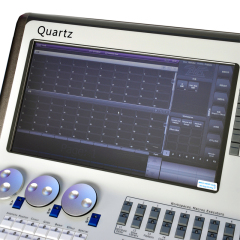
Product Overview
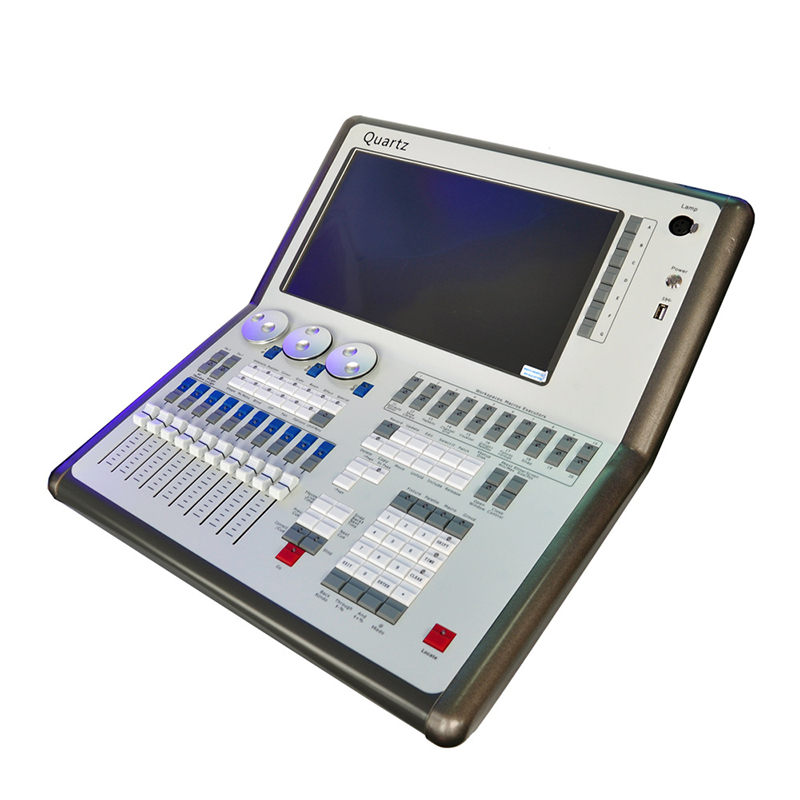
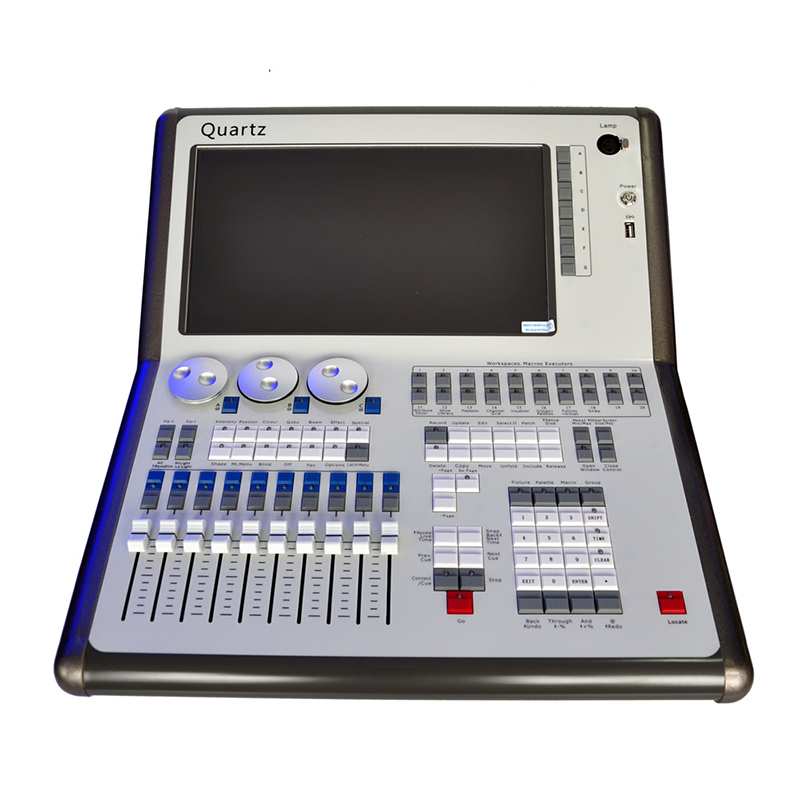
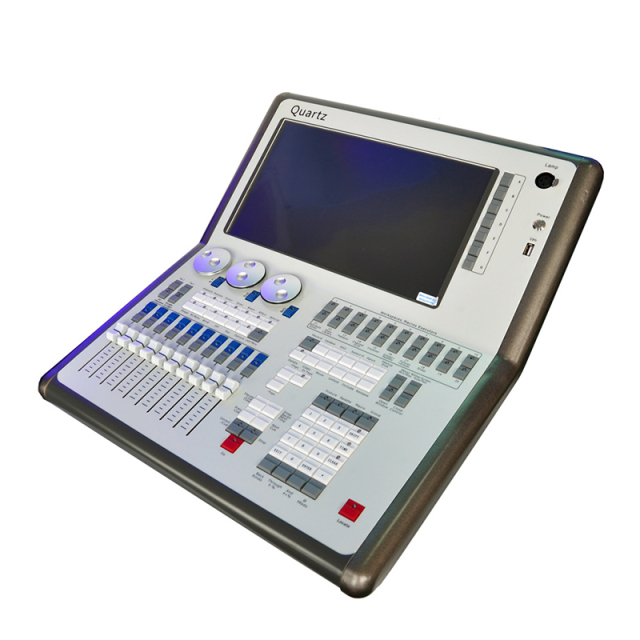
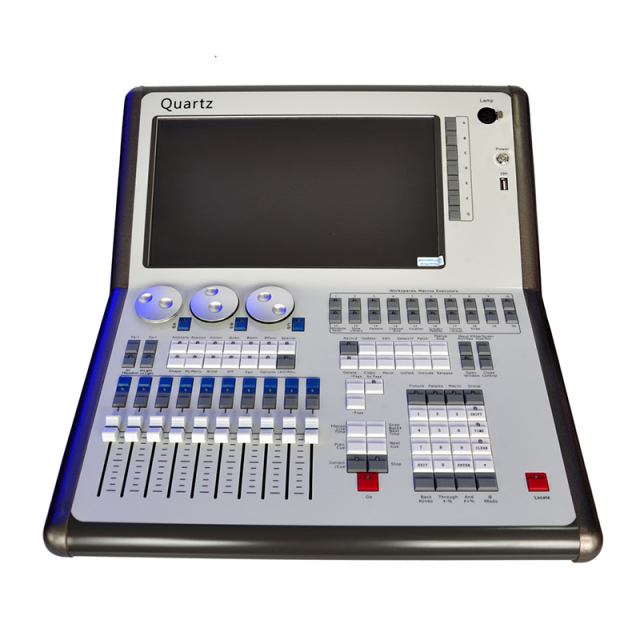
A 14.1-inch high-brightness touchscreen, dedicated programming keys and rotary controls give operators an integrated workspace for programming and playback on the Quartz Controller DMX512 System. Ten mechanical playback faders provide physical level control with page-based access to recorded playbacks, while twenty custom macro function keys offer direct access to assigned operations. Four built-in DMX output ports provide 2048 channels, with separate expansion paths supporting 12 universes through Art-Net or 64 universes through Titan-net, subject to compatible equipment and system configuration. An Intel Core i7 processor, 120G solid-state storage, 4GB running memory and a built-in UPS support the console’s hardware configuration.
Touchscreen & Playback Controls
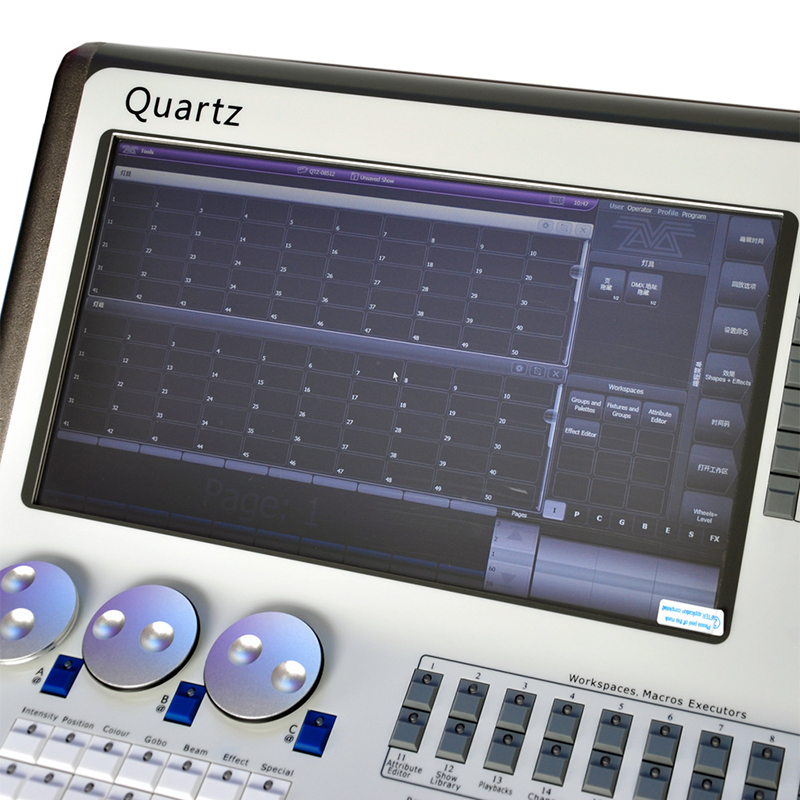
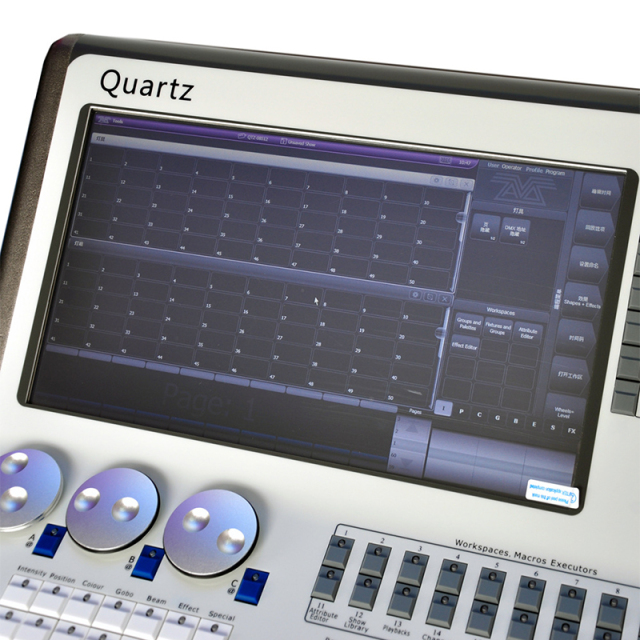
A 14.1-inch high-brightness touchscreen gives this dmx light controller an integrated workspace for programming and playback. Graphical control grids sit alongside dedicated physical controls, so operators can move between screen-based editing and hands-on operation.
Rotary controls and labeled Intensity, Position, Colour, Gobo, Beam and Effect functions support the attribute work expected from a moving head light controller. The silver control panel groups these controls around the display, keeping fixture adjustments close to the active workspace.
A numeric keypad and dedicated Record, Update, Edit, Copy, Move and Release keys provide direct access to common programming commands. Physical labels help an operator locate an action without relying entirely on touchscreen navigation.
Ten mechanical playback faders support page-based access to recorded playbacks. Operators can organize material across pages while retaining physical level control during a performance; clear page and playback names help prevent confusion when changing banks.
Twenty custom macro function keys provide dedicated access to assigned operations. Their usefulness depends on the programmed actions, so a consistent macro layout helps different operators work from the same show structure.
Titan Fader wing expansion adds a separate control surface with 20 playback faders and 30 custom macro functions, powered through USB. Wing inclusion and compatibility with the installed system need to match the intended configuration. LITEVISION is the dmx lighting controller supplier for this console; the expansion-hardware name does not establish an official third-party brand affiliation.
DMX & Network Outputs
- Four built-in DMX output ports provide 2048 channels as the default 4 x512 output of this dmx 512 controller. These are the direct physical connections available at the console.
- Art-Net network output allows the dmx lighting control system to expand to 12 universes through a suitable network configuration. Network-to-DMX nodes are needed wherever Ethernet data must become a physical DMX line for connected fixtures.
- Titan-net support provides a separate expansion path to 64 universes for a dmx controller for moving heads. Reaching that capacity depends on compatible connected equipment and the supported system configuration; it is not an additional bank of physical sockets on the console.
- One Gigabit network interface supports Art-Net, Titan-net and Streaming CAN protocols. A protocol name identifies a communication method, so connected equipment must support the intended method rather than Ethernet connectivity alone.
- Fixture count on a dmx led controller depends on each fixture's channel footprint. A basic dimmer mode uses a different amount of address space from a mode with separate emitter, effect and control channels.
- Channel capacity and fixture parameters describe different things. A dmx moving head controller may use several DMX channels for one attribute, so universe figures cannot be treated as equivalent parameter counts.
- Direct output, Art-Net expansion and Titan-net expansion are separate operating arrangements. Their headline capacities must not be added together without a documented configuration that supports that combination.
Hardware & Transport Data
| Property | Value |
|---|
| Processor | Intel Core i7 |
| Solid-state storage | 120G |
| Running memory | 4GB |
| Backup power | Built-in UPS |
| UPS runtime | 90 minutes, subject to operating load and battery condition |
| Headphone output | Supported |
| Console category | dmx light controller |
| Carton size | 59x52x29 |
| Carton weight | 13.3 kg |
| Flycase size | 59x55x34 |
| Flight-case weight | 22.8 kg |
Setup & Commissioning
- Place the console on a stable operating desk with room for hands, cables and ventilation. Use verified chassis measurements for the desk or rack layout: transport-case measurements do not define the console footprint, and the dimension units require verification. Any suspended or custom-mounted arrangement needs a documented mounting method rather than assumptions based on case size.
- Check the console rating label and connection instructions before applying mains power. The input rating, protective-earthing requirements and connector pinout must match the actual unit and local electrical installation.
- Connect the dmx 512 controller with purpose-made DMX data cable, following the fixture manufacturer's instructions for line termination and distribution. Keep cable strain away from the console sockets and use suitable distribution equipment when separate branches are required.
- Set each luminaire's address and operating mode before patching the dmx led controller. The console personality must describe that same mode; a mismatch can place dimming, colour or control functions on the wrong channels.
- Check pan and tilt direction, home positions and movement clearance when commissioning the moving head light controller. Test movement with people and obstructions clear of the fixtures, then establish any position limits required by the installation.
- Assign the network settings and output destinations for the dmx lighting control system before connecting it to a shared production network. Check addressing, subnet settings and universe mapping, and resolve duplicate output sources before enabling live control.
- Run an end-to-end rehearsal from the dmx moving head controller through the connected rig. Check cue order, fades, blackout and release behavior, then save the commissioned show separately from the original programming file.
Systems & Show Files
Five-system switching is supported, with System V16, V9.1 10.1 11.1 named among the operating versions. The complete system list and the installed build need to be established for the supplied console; an unnamed system should not be assumed from the switching count.
Show files from other TITAN system consoles are supported by this dmx light controller. Before a production changeover, open a copy of the intended file in the installed build and check that it loads without unresolved dependencies.
Fixture personalities used by a dmx controller for moving heads can change between software releases. Retain the personality revision associated with the show so that replacing or updating a file does not silently change attribute behavior.
Software entitlement, permitted updates and third-party authorization need separate confirmation with the dmx lighting controller supplier. A familiar system name or compatible file format does not establish a software licence, an update entitlement or an authorized relationship with another brand.
System changes should be made during preparation rather than immediately before a performance. Keep the original show file untouched, identify the working copy by software build and date, and check the supported recovery procedure before changing the operating environment.
Stage Applications
- Theater productions can organize a dmx lighting control system around scripted scenes, transitions and repeatable cue order. A structured show file helps the operator follow rehearsed changes from opening state to curtain call.
- Concert operators can prepare a moving head light controller around fixture groups, position palettes and effect combinations for live musical changes. Separating these building blocks makes it easier to respond to an extended song or an altered set list.
- Nightclubs can use a dmx led controller to build distinct looks for dance-floor activity, quieter periods and featured performances. Naming those looks by venue task helps staff find the intended atmosphere during a busy evening.
- School performance spaces can organize a dmx 512 controller around a small set of clearly named stage areas and reusable lighting states. This gives occasional operators a more understandable show layout while leaving detailed programming work to trained staff.
- Rental preparation can use a dmx controller for moving heads to build job-specific show templates before equipment reaches the venue. Grouping fixtures by their production function helps keep the control layout understandable when the rig changes between events.
- Studio lighting operators can use a dmx moving head controller for manual position adjustments and stored lighting looks during set changes. Any camera-synchronization or external show-control requirement needs its own documented interface; it should not be assumed from general console operation.
Downloads & Technical Documents
- Request the model-specific Quartz specification sheet and check its revision against the supplied hardware. File availability needs to be checked before relying on a document for installation planning.
- Obtain the operator manual for the installed operating system. It should cover startup, shutdown, file management, system changes and recovery rather than instructions for a similarly named console.
- Review the connection diagram for connector identification, signal wiring and supported external equipment. A diagram for the actual configuration is more useful than a generic console illustration when preparing an installation.
- Obtain channel tables and fixture personalities for the connected luminaires, matched to their firmware and operating modes. Photometric files also belong to those luminaires: a control console has no light-output distribution of its own.
- Check the model-specific declaration and test documents required by the destination market. Their product identification and configuration must match the supplied console; a general company statement does not establish conformity for this unit.
- Keep a revision record for technical files requested from your dmx lighting controller supplier. Include any available service instructions for battery replacement and internal maintenance so technicians can distinguish operator tasks from work that requires qualified service.
Control Surface Care
Schedule control-surface cleaning between jobs, with the console fully shut down and disconnected from mains power. Unplugging the mains lead alone does not shut down a console with an internal UPS; finish the normal shutdown procedure before starting.
For the touchscreen, use a clean, soft, lint-free cloth and light pressure. Remove loose grit before wiping so it is not dragged across the display. Keep a separate cloth for the screen rather than using one that has picked up dirt from cables or transport equipment.
Wipe key tops and the areas around them gently, keeping moisture away from the gaps. Do not lift keycaps or scrape around their edges to remove stubborn deposits; leave cleaning that requires disassembly to a qualified technician.
Use a soft, dry brush to lift loose dust from around fader caps and slots, directing it away from the openings. Avoid pushing debris into the fader tracks, and do not apply oil, lubricant or contact cleaner without model-specific service instructions.
Use a screen-cleaning product only when its suitability is established in the supplied care instructions. Apply any permitted cleaner to the cloth rather than directly to the console, and avoid abrasive pads or household solvents. If liquid enters the controls, stop using the console and arrange inspection before powering it again.
Keep drinks away from the operating surface during shows and preparation. Before closing the transport case, make sure the surface is dry and remove loose objects that could press against the screen, keys or faders. If a control remains sticky or uneven after gentle exterior cleaning, arrange servicing rather than forcing it.
Technical Support & Model Matching
LITEVISION brings together more than 30 engineers who have worked in the industry for an average of 15+ years. Share your purchasing requirements and the models you are considering to discuss the available options with our team. We provide product maintenance and technical support, with customer service staff available to answer your questions and help address issues. Whether you are comparing options before ordering or need assistance after purchase, contact us with your technical questions and maintenance concerns.
FAQ
Does the internal UPS keep the connected lighting rig running?
No. The internal UPS backs up the console, not the connected lighting rig. Luminaires, network switches and output nodes need their own suitable backup power if they must continue operating during a mains interruption.
UPS backup is specified at 90 minutes. Confirm the expected runtime for the supplied console and battery condition before using that figure to plan an event; battery age, charge level and operating conditions can affect the time available.
For a brief interruption at the control position, console backup can give the operator time to save programming work and assess the situation. If mains power cannot be restored promptly, use the available battery time to follow the console’s shutdown procedure.
A powered console does not guarantee a predictable stage look when other equipment loses power or control data. Check each fixture’s available signal-loss settings and choose behavior appropriate to the performance, such as holding its last state or going to blackout where supported.
Before deployment, have a qualified technician test the intended power-interruption and recovery sequence under controlled conditions. Include the return of mains power so operators understand how the complete installation resumes operation before an audience is present.
For rental stock and permanent installations, include UPS battery checks in routine maintenance. Ask about charging guidance, replacement battery availability and the replacement procedure when arranging long-term support.
How many DMX universes can the console output directly, and what requires network expansion?
The console has four built-in DMX output ports providing 2048 channels, equivalent to four universes. Art-Net supports expansion to 12 universes, while Titan-net provides a separate expansion path to 64 universes, subject to compatible equipment and system configuration. Network-to-DMX nodes are needed wherever Ethernet data must become a physical DMX line. These capacities describe separate operating arrangements.
Can I add more physical playback faders and macro controls?
Titan Fader wing expansion adds a separate USB-powered control surface with 20 playback faders and 30 custom macro functions. The console itself has ten mechanical playback faders and twenty custom macro function keys. Wing inclusion and compatibility with the installed system need to match the intended configuration. The expansion-hardware name does not establish an official third-party brand affiliation.
How do I determine how many fixtures this controller can handle?
Fixture capacity depends on each fixture's DMX channel footprint. A basic dimmer mode uses a different amount of address space from a mode with separate emitter, effect and control channels. Use the channel footprint of the intended fixture modes when assessing output capacity. Universe capacity and fixture parameters describe different things, and one attribute may use several DMX channels.
Which programming controls are available alongside the touchscreen?
The console combines a 14.1-inch high-brightness touchscreen with rotary controls, a numeric keypad and dedicated programming keys. Record, Update, Edit, Copy, Move and Release keys provide direct access to common commands. Labeled Intensity, Position, Colour, Gobo, Beam and Effect functions support fixture attribute adjustments. Ten mechanical playback faders provide physical level control with page-based access to recorded playbacks.
How should the touchscreen, keys and faders be cleaned?
Power down and disconnect the console before cleaning. Use a soft, dry cloth for routine surface cleaning, keep liquids out of the fader slots and key openings, and follow the display manufacturer's instructions for any screen-cleaning product. Avoid spraying cleaner directly onto the control surface.